Case studyWeb App · AI
Money Tracker
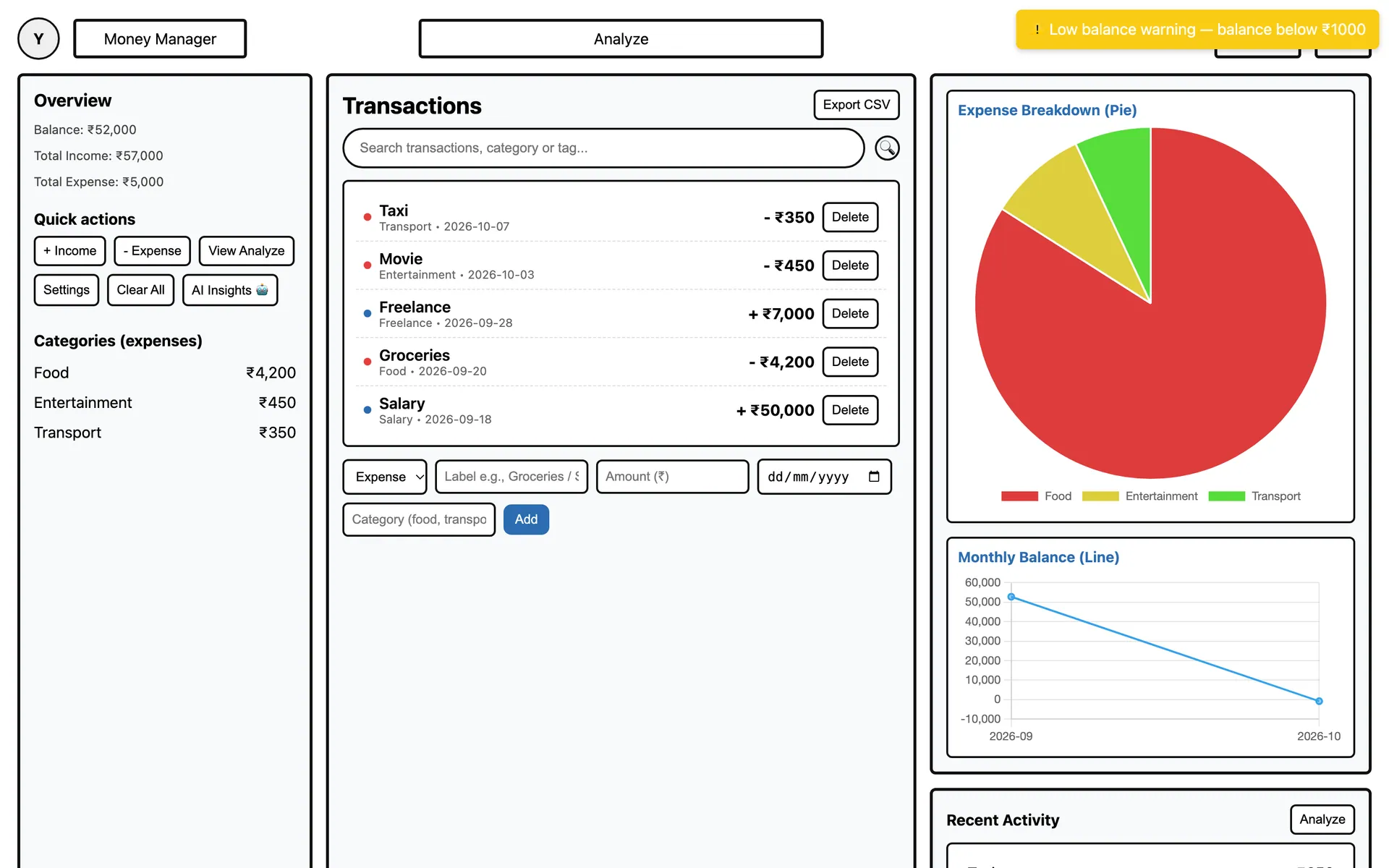
A personal finance dashboard that lives in a single HTML file. It tracks income and expenses, charts where the money goes, locks behind a PIN, and asks Google Gemini for plain-language insights — all without a server or an account.
01 The problem
Keeping track of money usually means signing up for an app and handing your financial data to a server you don’t control. For simple personal budgeting, that’s more friction — and more risk — than the job needs.
Money Tracker takes the opposite approach. The entire app is one HTML file: open it in a browser and it works, with everything stored on that device.
02 Goals
- No account and no server — open the file and start tracking.
- Data stays on the device, protected behind a PIN.
- See where money goes at a glance, not after scrolling a table.
- Never be locked in: export to CSV, back up and restore as JSON.
03 How it works
Auto-categorisation
Each transaction label is matched against keyword rules — “grocery” becomes Food, “taxi” becomes Transport, “salary” becomes Salary — so the charts stay organised without extra typing.
Charts with Chart.js
An expense breakdown pie chart, a monthly balance line chart and an interactive analysis view with bar charts, all redrawn whenever data changes.
PIN lock
On first launch you set a PIN. It’s hashed with SHA-256 through the browser’s Web Crypto API and only the hash is stored — the dashboard loads after a correct unlock.
Local persistence
All income and expense entries live in one state object saved to localStorage, together with profile, theme and colour preferences.
Export, backup & restore
Transactions export to CSV for spreadsheets. A full JSON backup captures the data and theme so it can be restored on another browser.
AI insights & smart alerts
A summary of totals and the top spending category is sent to Google’s Gemini API, which replies with plain-language advice. Rule-based alerts flag things like a low balance.
04 A look at the code
function autoCategorize(name, type) {
  const n = name.toLowerCase();
  if (type === 'income') {
    if (n.includes('salary') || n.includes('payroll')) return 'Salary';
    if (n.includes('freelance') || n.includes('project')) return 'Freelance';
    return 'Income';
  }
  if (n.includes('food') || n.includes('grocery')) return 'Food';
  if (n.includes('taxi') || n.includes('bus') || n.includes('fuel')) return 'Transport';
  if (n.includes('rent') || n.includes('bill')) return 'Utilities';
  return 'General';
}async function hashPin(pin) {
const data = new TextEncoder().encode(pin);
const hash = await crypto.subtle.digest('SHA-256', data);
return [...new Uint8Array(hash)]
.map(b => b.toString(16).padStart(2, '0'))
.join('');
}05 Stack
- HTML
- CSS
- JavaScript
- Chart.js
- Gemini API
- Web Crypto
- localStorage
Want to see more?
The full source is on GitHub, and there’s more work on the home page.